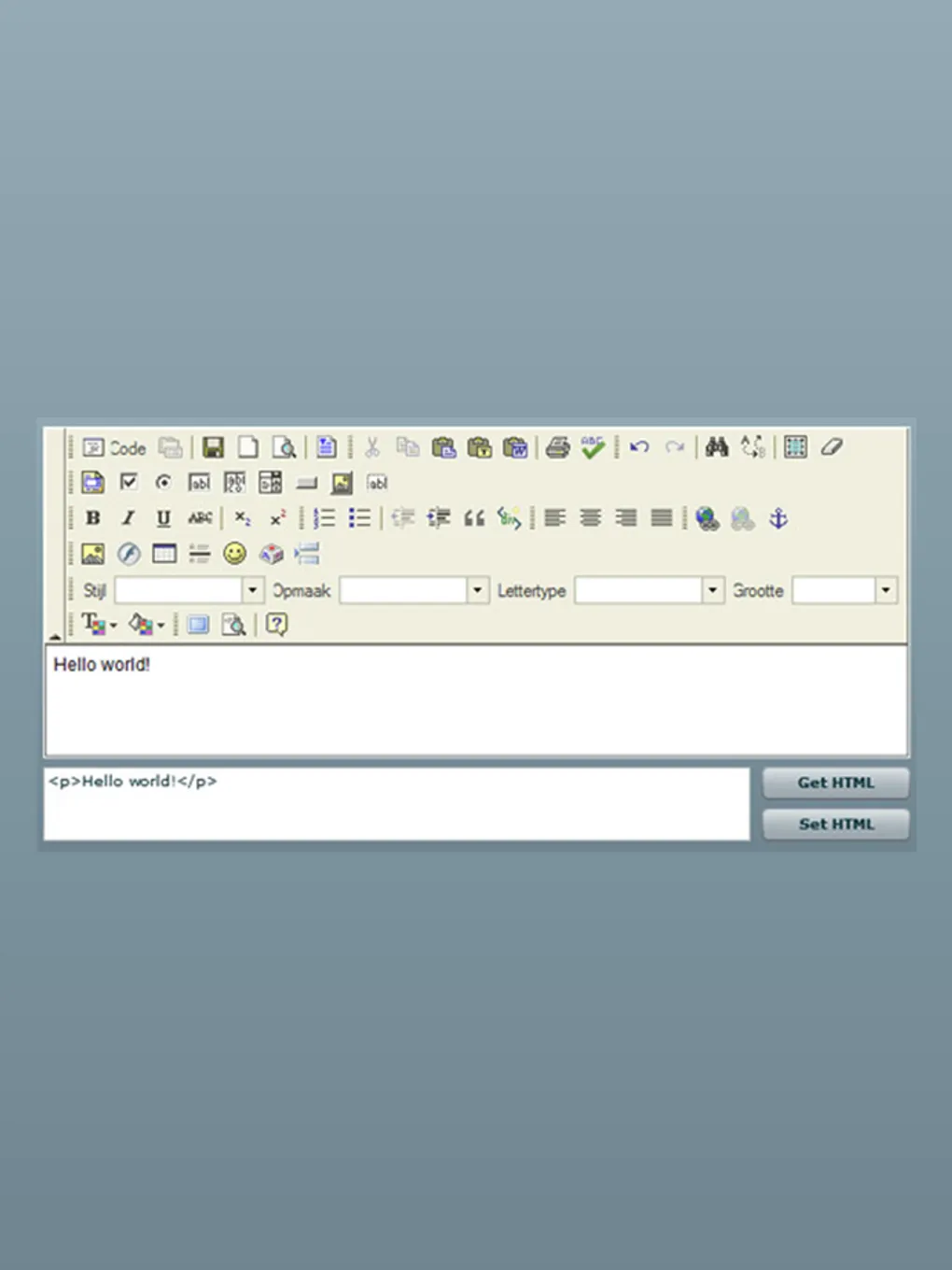
One of the most wanted features in Adobe Flex / AIR is a better Rich Text Editor. There are some great ones available for javascript, so why can’t we have an editor with the same featureset? Well, it is actually possible to incorporate existing javascript editors in your Flex / AIR applications.

You can check out a demo at http://labs.aboutme.be/flex_fckeditor/
You can download my library + demo’s at http://blog.aboutme.be/wp-content/uploads/flex_fckeditor/flex_fck_editor_0.1.zip
When you extract the zip file, you will find an swc file, an assets folder and de demos folder. If you want to use FCKEditor in your own Flex or AIR projects, add the swc to your library path, and the assets folder to your src folder (just like the demo projects).
When you use the component in a Flex project, you need to ensure you set the wmode property to ‘opaque’. Also, if you run it on your local filesystem with Internet Explorer, you won’t see the component. It works fine if you run it on a webserver.
Currently it’s possible to get / set the htmlText, and change the toolbar set. I hope you enjoy this component, if you find any bugs or have feature request, feel free to post them in the comments.


does we need to upload “asset1″ folder at the server as well ?
I included it in the local src folder and used generated build file at our server. but it gives me error as “Page Not Found: /assets/fckeditor/fckeditor.html
“
Thank you, Wouter!
It works great.
Thanks alot … just what i was looking for..
I have 1 question… how do i pass the swf some content when it loads. I have looked for the flash var where i could put the content.. but i cant find it..
hope you can help me
Morten
Would it be possible to get the code for your swc? I am trying to integrate this into a project I’m working on, but there are a few changes I need to make. Support for 2-way binding, etc.
Excellent solutions.
Any plans to update it with the CKeditor version 3?
If not, can you point me in the right direction?
Great work!
Actually, I’m working on the CKEditor version. Stay tuned!
Hey! That’s a very good solution. It’s only one problem with it. If you put this component in a ViewStack and turn this stack into other child, the component remains some pictures if it has. But this bug is only in IE. In FF there’s no problem. I think this bug came from the visibility: hidden or visible style in the fck div. I think if you use the display:block or none style declaration, then this is solved.
Actually this is the best solution from all.
Finally, Would it be possible to get the source?
Hi, I am REALLY interested in the CKEditor version, how is it going? Hope can see it soon.
Hi, fckEditor is a great tool.
Its very interesting. Mean while i have a problem.
I created a web page and include the flex fckEditor.swf file in my html. but it does not display anything.
Please help me out….
I’ve got the CKEditor working in FLex. However, the AIR version is causing some problems – which won’t be fixed until CKEditor 3.1. I’ll take a look at the nightly builds to see if I get one of those working in AIR :-)
I am working with CKEditor in AIR too.
At the last step in my work, CKEditor cannot pass the most update HTML code to AIR.
Everytime i use function to load the HTML code, it will return the default html textarea to AIR.
For example: [This is some sample text. You are using FCKeditor.]
I want to ask it is the problem of use the CKEditor with AIR or my coding problem?
I am using htmlLoader load the CKEditor html page in AIR.
Here is my code to get back the CKEditor HTML code (editor_office2003 is my CKEditor textarea ID):
htmlLoader.window.CKEDITOR.document.getById(’editor_office2003′).getHtml();
There you go, CKEditor running in Flex and AIR now: http://blog.aboutme.be/2009/10/25/ckeditor-running-in-flex-and-air/
can you help me ?? please . when I tried to add the swc to my library path in my project show this message ….
ArgumentError: Error #1063: Argument count mismatch on mx.core::CrossDomainRSLItem(). Expected 5, got 6.
at mx.managers::SystemManager/http://www.adobe.com/2006/flex/mx/internal::initialize()[C:\autobuild\3.2.0\frameworks\projects\framework\src\mx\managers\SystemManager.as:1825]
at mx.managers::SystemManager/initHandler()[C:\autobuild\3.2.0\frameworks\projects\framework\src\mx\managers\SystemManager.as:2904]
I don’t understand why, this error isn’t my code
Is it possible to get the id of the div wraping the editor?
Is there a reason I cannot click on an a href link within the editor?
Hey! This article has helped me in a great way. I require some changes on having the ability to selectively enable and disable the buttons on the tool bar eg: Disable the BOLD/ITALIC button for some operation. Could you guide me on how to customise this swc to meet this?
Can we have the source of FCKEDITOR.swc.Need to tweak it for our requirements.
I see a huge problem disabling the workarea .I was trying and have the copy/paste and scrolling working for me.I was able to do that in html/javasript sample program with CKEditor.But I was not able to do so in the AIR application. Do you have any solution for that.
hi,
I have integrate fckeditor into flex its working fine into FF and other browser but in IE not displaying and not given any error please help me its urgent for me.
The native mx:RichTextEditor doesn’t have the capacity to handle images the appropriate way, plus the HTML it produces is a mess.
I was thinking of using the Adobe’s new Text Layout Framework, which is working nicely, however it adds additional 500kB to my project (Flex 3) and it hasn’t reached a stable release yet.
To conclude, your solution is just the thing I needed!
Thanks for sharing!
I’ve just noticed that your SWC somehow causes my Flex application to misinterpret keystrokes on special localized keys. I’m using a non-US keyboard with 5 localized keys/characters (č,ć,ž,š and đ), which he application now interprets as two-byte characters (they show up on the screen as two little squares).
By deleting your SWC from the lib directory and recompiling the application, everything was back to normal.
How can this be fixed?
I discovered what caused the problem. It wasn’t your component at all – your code is working beautifully. It was the “wmode” – when set to “opaque” my local characters stop working.
The problem has a solution – it’s described on this page:
http://nicolas.cynober.fr/blog/116,flex-workaround-for-wmode-bug.html
I can’t see the component in Firefox when running on my local system.
Should this be the case?
hello and thank for your work
i have an error with,
i have put your component in a tabNavigator. when i load ckeditor with html page inside , the first time it’s ok, but if I click on tabNavigator and i comme back to the ckeditor tabnavigator I have this error message :
TypeError: Undefined value
at be.happybanana.ckeditor.instance.air::CKEditorAir/updateTimerHandler()[/Users/wouter/Documents/experiments/CKEditor/src/be/happybanana/ckeditor/instance/air/CKEditorAir.as:75]
at flash.utils::Timer/_timerDispatch()
at flash.utils::Timer/tick()
I can’t find the error I haven’t got your source.
have you got an idea about this error? may be it’ll be genius if you give us the source, it’s not an obligation , of course ;-)
thank a lot
hello,
i’m using this on an Air application, but i can’t use the Image uploader function.
There’s a way to customize it and create a new one in Air and call it from the editor?
Thank you
Hi,
Thanks for your excellent work!!
I wanted to use this code in my product, so what is the license for it, can we also distribute the fckeditor.swc file with our source code too?
And can you provide source code for it too? It will be really great.
Thanks,
Snehal
@Bruno,
I got the same error like you, my solution is:
myCkEditorID.initialized = false; myCkEditorID.txtContent.initialize();
each time you want change the htmlText, this error usually happen if you use ViewStack or dinamicy htmlText.
@Yacobus Reinhart
I try it
thank a lot
it always in the front? when i want to popup a panel,the fckeditor will mask the panel, i can NOT see the my panel.
Thank you~!
It is working very good in my site.
I want this editor to enabled.
But enabled=”false” not working.
How can I set?
Hi there!
I’m using FCKEditor in my website’s admin panel to insert and update data into my database.
When I select this data from database, it display very well in simple html. BUT when I display it in FLEX(mxml) with a Text, some words were coded. ( I’m using Vietnamese and UTF-8)
Example: Hi there = Xin chào các bạn ( in Vietnamese) but in flex it display: Xin chào các bạn
Please help me!.
Thank you for your reply.
Hi there!
I’m using FCKEditor in my website’s admin panel to insert and update data into my database.
When I select this data from database, it display very well in simple html. BUT when I display it in FLEX(mxml) with a Text, some words were coded. ( I’m using Vietnamese and UTF-8)
Example: Hi there = Xin chào các bạn ( in Vietnamese) but in flex it display: Xin chào các bạn
Please help me!.
Thank you for your reply.
hi,I want to use it in my company project but file upload can not
(My project server is java , client is felx)
need your help very much
Thanks
from BeiJing